The internet has made it possible to do almost anything from a phone or computer.
You can shop, pay bills, register for services, apply for jobs, manage your business and communicate with people around the world.
But there is another side to that convenience.
Not every website you come across deserves your trust.
A website can look professional and still be designed to trick visitors into giving away passwords, card details or other personal information.
The good news is that there are a few simple things you can check before entering sensitive information.
Start With the Website Address
Before entering your password or payment information, look at the address bar.
You should see a domain that matches the organization you're actually trying to visit.
For example, if you're trying to visit a particular bank, don't assume a website is legitimate simply because it uses the bank's logo.
Scammers can copy logos, colors and even the general appearance of legitimate websites.
The domain name is much more important.
Pay close attention to unusual spellings, extra words and strange domain extensions.
A small difference in a web address can be easy to miss when you're in a hurry.
HTTPS Is Important, But It Doesn't Prove a Website Is Legitimate
You may have noticed that many websites begin with:
https://
Your browser may also display a padlock symbol.
HTTPS means the connection between your browser and the website is encrypted.
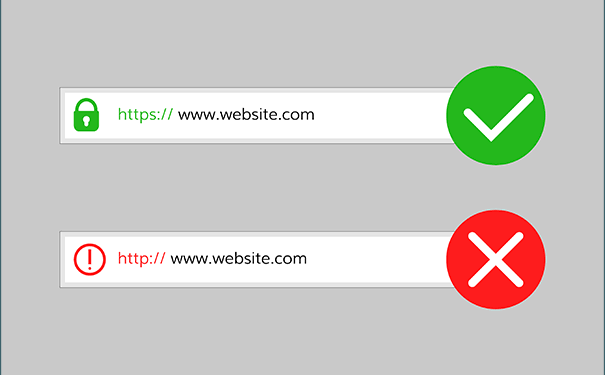
That's important, particularly when you're sending information.
But here's the part many people misunderstand:
HTTPS does not automatically mean the website itself is trustworthy.
A fraudulent website can also use HTTPS.
So don't look at the padlock and immediately assume everything is safe.
Check the actual domain as well.
Be Suspicious of Unexpected Links
Suppose you receive an email saying:
> “Your account will be suspended today. Click here to verify your information.”
That kind of message is designed to make you panic.
Instead of clicking immediately, slow down.
Ask yourself:
Was I expecting this message?
Do I recognize the sender?
Why am I being asked to verify something?
Does the link actually lead to the organization's legitimate website?
When you're unsure, don't use the link in the message.
Open the organization's official website yourself or use its official application.
Check the Domain Carefully
Scammers sometimes create addresses that look convincing at first glance.
Imagine you're trying to visit:
example.com
A fraudulent website might use a domain that contains additional words or characters designed to make it look related.
This is why it's worth reading the entire address instead of only looking at the logo on the page.
If you're entering sensitive information, take a few extra seconds.
That small habit can prevent a big mistake.
Don't Trust a Website Just Because It Looks Professional
Modern website-building tools make it relatively easy to create attractive websites.
A scam website can have:
Professional photographs
Good-looking buttons
Customer testimonials
Contact pages
Company logos
Attractive animations
A convincing checkout page
None of those things prove that the business is legitimate.
Look beyond the design.
Who operates the website?
Is the company information verifiable?
Does the domain make sense?
Can you find reliable information about the organization elsewhere?
If you're making a significant purchase, look for independent information rather than relying only on reviews displayed on the website itself.
Be Careful With “Too Good to Be True” Offers
This is one of the oldest rules on the internet, and it still matters.
If a website is offering a product for a tiny fraction of its normal price, stop and investigate before paying.
An unbelievable discount doesn't automatically mean it's a scam.
There could be a legitimate sale.
But it should make you more careful, not less.
The same applies to job offers, investment opportunities, giveaways and other online offers.
If someone is promising extraordinary returns with little or no risk, that's a reason to investigate further.
Check the Privacy Policy
This isn't something most people read.
I understand why.
Privacy policies can be long and full of legal language.
But if you're about to give a website sensitive personal information, it's worth checking whether the website explains what it does with your data.
Look for information about:
What information is collected
Why it's collected
Whether information is shared with other parties
How long information may be retained
How you can contact the organization
A privacy policy isn't proof that a website is trustworthy, but its absence can be worth treating as a warning sign, particularly for services asking for substantial personal information.
Don't Enter Passwords From Suspicious Pages
Imagine you're already logged into your email account.
You click a link and suddenly you're asked to enter your email password again.
Stop.
It could be legitimate.
But it could also be a phishing page designed to steal your credentials.
If you're uncertain, close the page and open the service directly through its official website or app.
You can then sign in normally.
This is particularly important for your email account because access to your email can potentially provide a path to resetting passwords for other accounts.
Use Your Browser's Warnings
Modern browsers can warn users about websites suspected of being dangerous.
If your browser displays a prominent security warning, don't simply ignore it because you're in a hurry.
Read the warning.
If the website isn't essential, leave it.
You don't need to prove that your browser is wrong.
Keep Your Browser Updated
Browser updates aren't just about new features.
They can include security fixes that address vulnerabilities.
Whether you're using Chrome, Edge, Firefox, Safari or another browser, keeping it reasonably up to date is an important part of staying safer online.
The same applies to your phone and computer operating system.
What Should You Do If You Already Entered Your Password?
Don't panic.
Act quickly.
If you entered your password on a website you now suspect is fraudulent, change that password through the legitimate website or official app.
If you've reused that password elsewhere, change it on those accounts too.
Enable two-factor authentication where available.
If financial information was entered, contact your bank or payment provider through an official channel and explain what happened.
The sooner you respond, the better.
A Simple Habit That Can Protect You
Before entering sensitive information on a website, pause for a few seconds and ask:
“How did I get here?”
If you arrived through an unexpected email, text message or social media advertisement, be more cautious.
If you opened the organization's official website yourself or used its official application, you have a clearer starting point.
That simple pause can interrupt the rush that scammers often rely on.
Final Thoughts
You don't need to be a cybersecurity expert to become more careful online.
Start by checking the domain.
Don't blindly trust links.
Don't assume HTTPS means a website is legitimate.
Be suspicious of extraordinary offers.
And whenever something feels wrong, stop before entering your information.
The internet moves quickly, but you don't have to.
Sometimes the safest thing you can do online is take ten seconds to think before you click.
This article is part of Alvonbot.com's Technology & Digital Skills series.

Leave a comment
Your email address will not be published. Required fields are marked *